So, you’re a network engineer. You live in the CLI. You SSH into your devices. You work on your tickets. You read your logs. You get things done the way you’ve always gotten them done.
And like everyone else right now, you’re asking yourself how AI fits into your daily routine.
Imagine this. What if you could teach AI how you work, right inside the environment you already live in? What if you could hand off the repeatable stuff while you stay in the loop—without needing to learn a stitch of code?
No more imagining. It’s an AI reality, and this AI Break will teach you how. Plus, it doesn’t take moving your entire work life into some new tool—just your workflow, your terminal, and an agent that works the way you do.
It’s called an agent skill. The easiest way to think about agent skills is the way you think about your own.
You picked up a packet capture trick years ago, and it’s been on your tool belt ever since. Learn it once, reach for it forever. An agent skill is the same thing, passed on to your AI.
What is an agent skill, really?
A skill teaches your AI how to handle a specific task the way you’d handle it. Instead of re-explaining your process every conversation, you teach it once and get the payoff every time it runs.
Think about years of expertise in your head right now. For example, a ticket lands and you already know the moves: Check this before you touch that. Pull these logs. Verify in a set order. You’ve never written it down because you’ve never had to. It just lives rent-free in your head. A skill is your expertise, written down, one time, for the AI.
Why agent skills are better than prompts:
- A prompt is disposable. Close the window, and it’s gone. Next time, you start over.
- An agent’s skill sticks around. It loads when the work calls for it and runs the same way every time.
- Skills stack. You build small ones that each do a job well, and the agent grabs the right one when the moment calls for it. Over time, you’ve got a whole library working together.
- Skills can be shared. The benefits can become exponential by sharing across teams. Think repository of tried-and-true best practices.
- MCP gives it hands. On its own, a skill is just knowledge. Wire in MCP and it can pull the real ticket, read the live config, and act on what it finds, with you approving every step that matters.
How agent skills are built
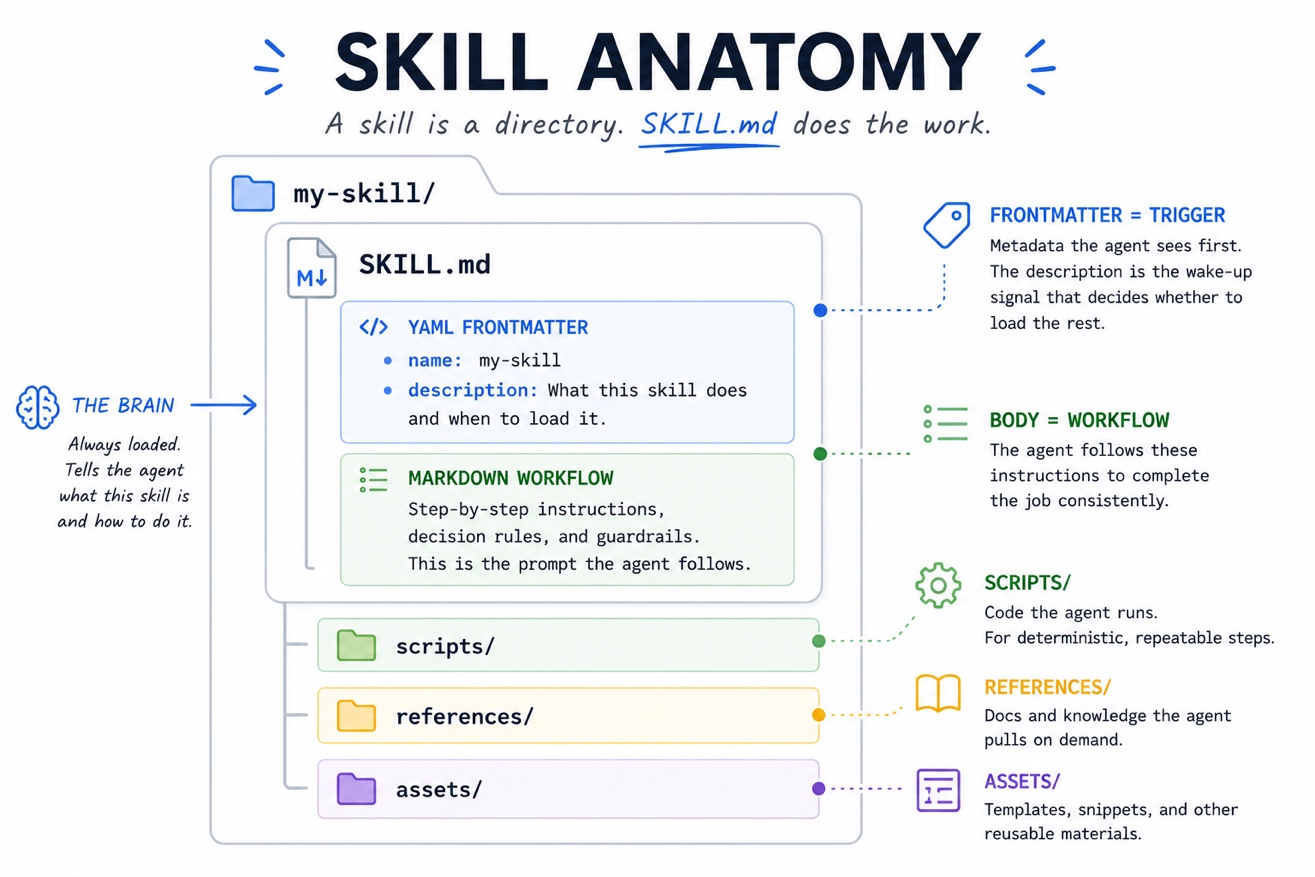
A skill is a directory. SKILL.md does the work: YAML frontmatter on top, a Markdown body underneath.
The frontmatter is metadata. Two fields to start:
name: kebab-case, matched to the folderdescription: what the skill does and when to load it, under 1024 characters
Don’t sleep on that description. It’s the only part the agent sees by default, so it decides whether the rest even loads.
That’s progressive disclosure: The body loads only when it’s relevant and reference files only when the agent reaches for them. Too vague, and the skill never wakes up. Too broad, and it fires when you don’t want it to.
The body is your workflow, plus three optional folders:
scripts/: code the agent runsreferences/: docs it pulls on demandassets/: templates it works from
This is where prompt engineering earns its keep. The body is a prompt, and the agent does what it says. “Generate the report” leaves it guessing. Spell out the format and the sections, and you get the same result every time. For steps that can’t drift, call a script instead of trusting ever-changing prose.
And here’s the part that should make every network engineer sit up. That scripts/ folder is where your automation comes back to life. The Ansible playbooks you wrote for deployments, the Terraform plans that stand up your infrastructure, the scripts you’ve built over years of network ops: none of it is wasted. You drop it in scripts/, and the agent runs it on your terms, when your skill tells it to. Your automation doesn’t compete with AI. It becomes the tool the agent reaches for. The work you already did just got more valuable.
Let the AI come to you
The core idea is not locked to one vendor. Agent skills are an open standard. This means the basic building blocks can move across skills-compatible agents. The details may change from tool to tool, but the pattern holds.
To build something real, though, I must pick one. For my use case, my AI of choice is Anthropic’s Claude, running in Claude Code. And the reason matters more than the brand.
Most AI shows up as a chat window or a panel bolted onto an IDE. Useful, but it’s not where we work. We work in the terminal. We SSH into boxes, run show commands, pipe output through grep, and live at the prompt.
Claude Code runs right there in the CLI. The agent meets you in your environment instead of asking you to move into its. No new IDE to learn. No “rewrite your life in Python first.” You stay at the terminal you already know, and the AI comes to you.
That’s the unlock for network engineers. You don’t have to become a developer to get the payoff. You bring your skill, your terminal, and your judgment, and the agent works alongside you right where you already are.
From here, the filenames get Claude-flavored. The pattern still maps to whatever agent you run. Only the names change.
Meet Iris, an agent skill for network operations
I built one. It’s called Iris: the network agent that keeps an eye on your network. It also happens to be my daughter’s name, so it felt fitting for a skill that watches over things. It’s on my GitHub. It’s a working agent skill for network operations, and you can clone it today.
The idea is simple. You still own every decision. Iris handles the work around those decisions: pulling device state, checking it against your source of truth, running pre-condition checks, drafting the change, verifying it after, and writing it up in the ticket. Iris is built from the exact blocks we just covered. Here’s how they map.
`CLAUDE.md` is the operating contract. Iris’s persona and its guardrails in one file. The rules are the part that matters:
- Discover before you assume
- Verify before you change
- Never push a change without explicit approval
- Stop if something looks wrong
- Close the ticket with enough detail that the next engineer can reconstruct what happened
You’re handing an agent access to your network, so those rules aren’t decoration. They’re what keep it from doing something catastrophic at 2 a.m.
`SKILL.md` is the brain. The workflow Iris runs on every ticket, in the same order every time:
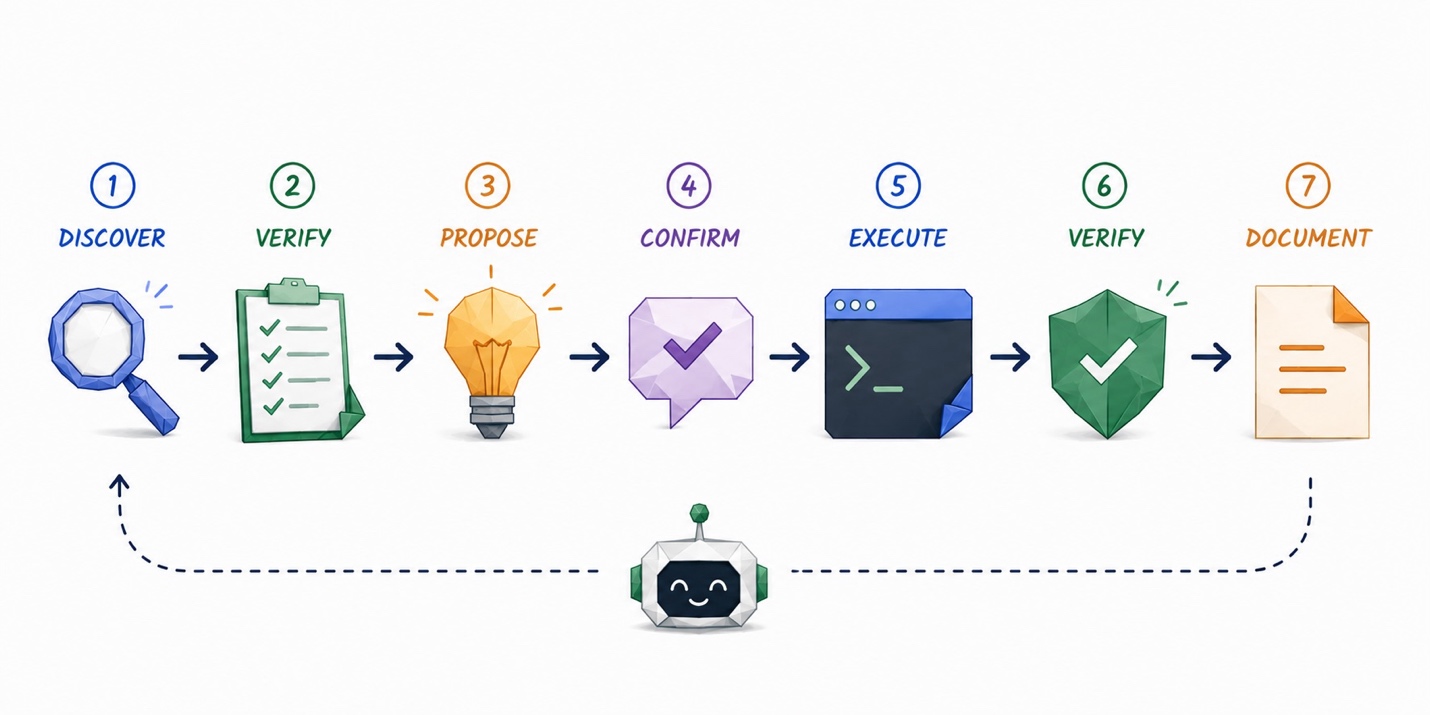
The discipline doesn’t change whether you’re touching Catalyst CLI, the Meraki dashboard, or a Terraform plan. And human-in-the-loop is baked into the workflow itself. Iris proposes a plan and waits for your “yes” before it touches anything. It’s not a setting you remember to turn on.
The `.claude` folder and `.mcp.json` are the connections. This is where Iris gets its hands. The MCP wiring points at the systems you run. You don’t need all of them, but the more you connect, the more Iris can do:
- Ticketing: ServiceNow, Jira
- Device management: CML, Meraki, Catalyst Center, direct CLI
- Source of truth: NetBox
- Observability: Splunk, ThousandEyes
Two more folders are worth knowing:
environment/is where Iris learns what your network looks like on first run, pulling from your MCPs, your docs, and any discovery scripts you drop in.automation/is that tool belt from earlier. Drop your playbooks and scripts in, and Iris learns them, tags each one read-only or state-changing, and only runs the state-changing ones you approve.
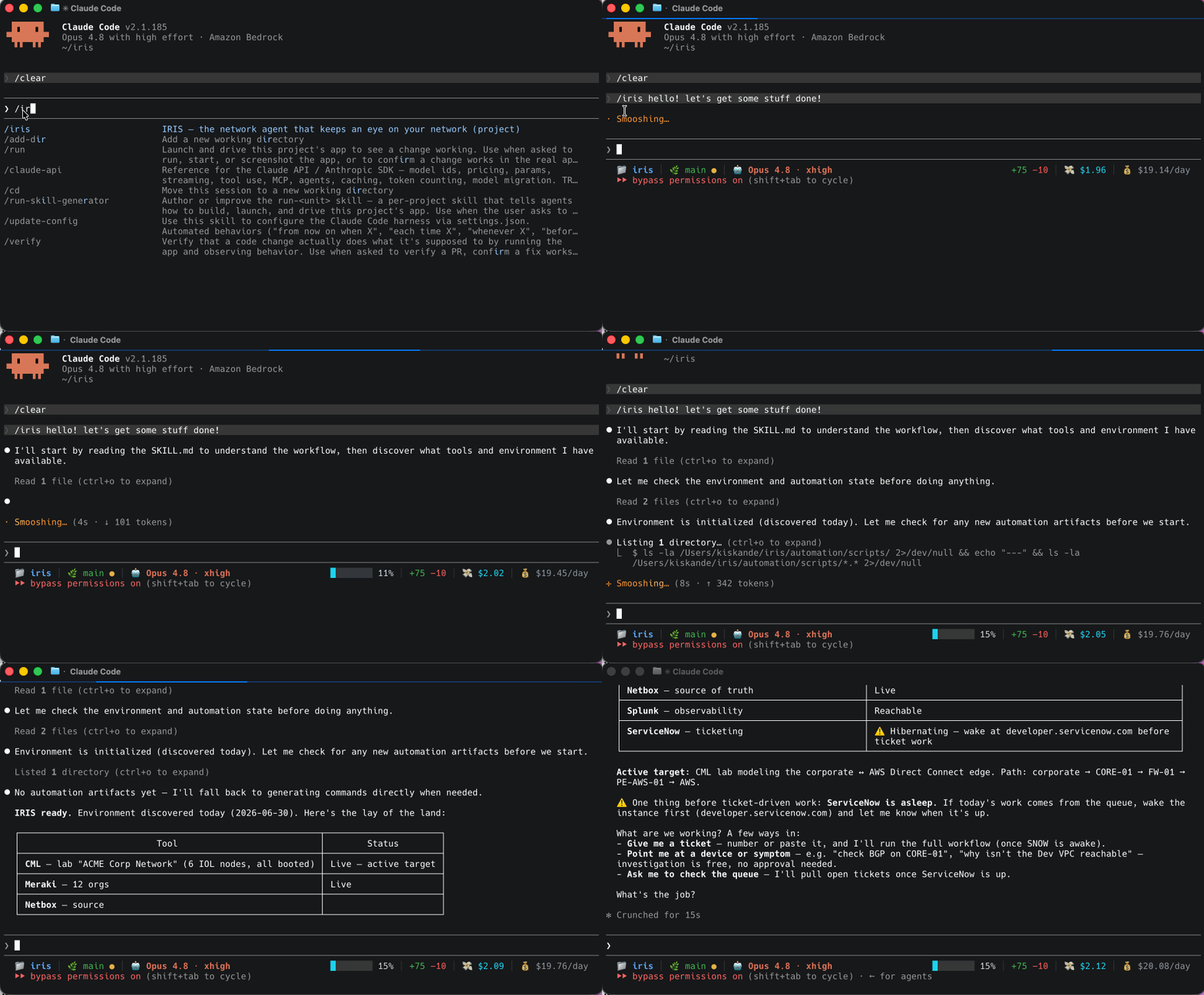
Now picture a skill on the job. A ticket comes in: a new VPC needs to reach an on-prem staging environment. Normally you are the one reading the ticket, checking what’s deployed, working out the routing and the firewall path, then SSHing in to make it happen.
With Iris, the AI agent is doing most of the work:
- Restates the ticket in plain language and confirms before touching anything.
- Discovers what’s actually out there instead of assuming.
- Validates pre-conditions and stops if a check fails.
- Proposes a plan that includes the exact commands, exact API calls, and expected outcomes.
You approve or push back, because you’re the engineer, and you know what right looks like. Only then does the agent execute, verify, and document.
You never left the terminal. You never stopped being the one in charge. The agent handled the busywork while you kept your eyes on the network.
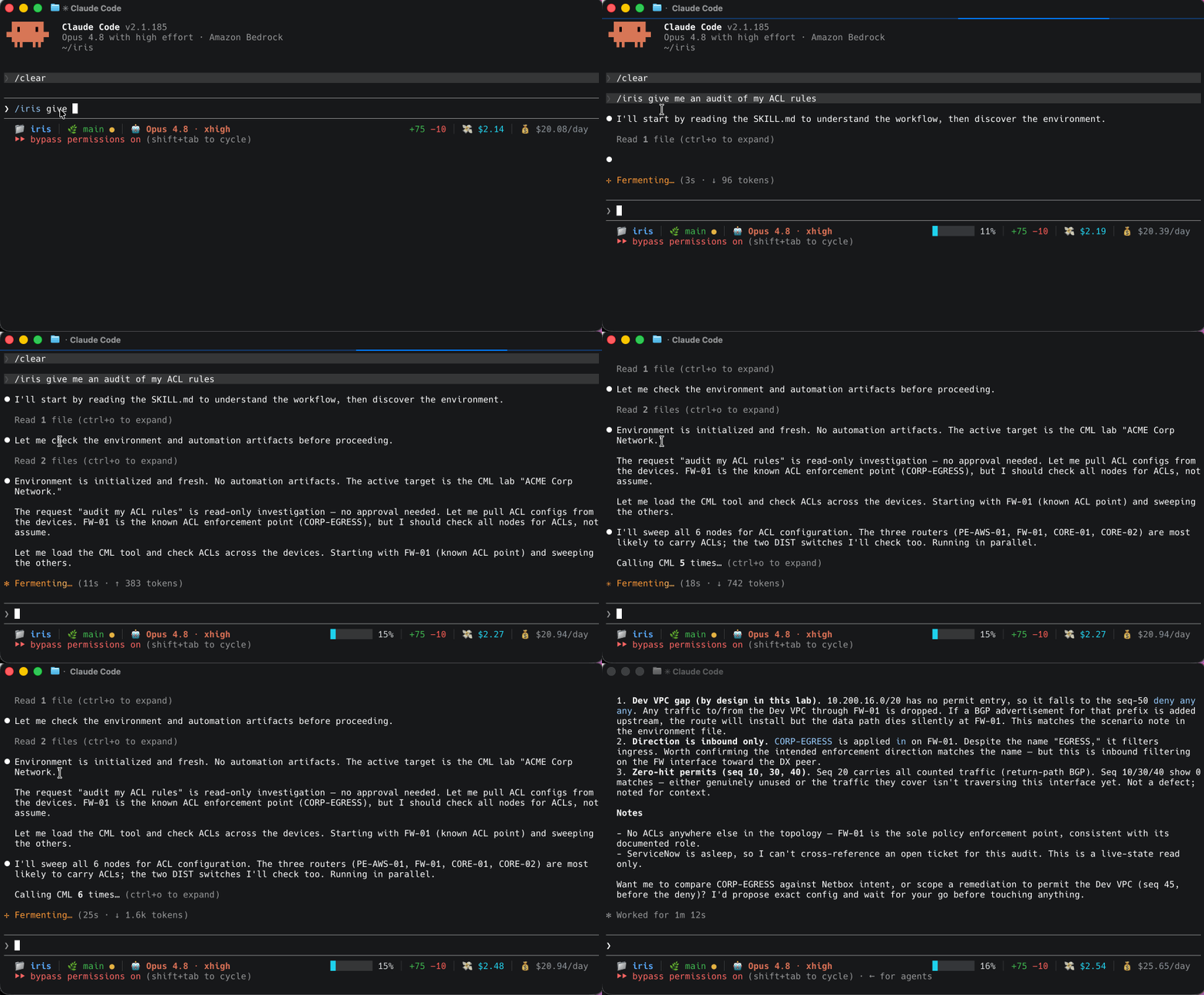
Build your own agent skill
Here’s the thing about Iris: it’s a starting point, not a destination. It works the way you work. Your network is different, your process is different, your guardrails are different.
Take it and make it yours:
- Clone the repo. It’s on GitHub, MIT licensed.
git cloneand you’re in. - Edit `CLAUDE.md` and `SKILL.md`. Change the rules to match your shop. Change the workflow to match how you and your network operate.
- Wire your own `.mcp.json`. Point it at your ticketing, your devices, your source of truth. Connect what you’ve got.
- Drop in your automation. Those playbooks and scripts you already trust go in
automation/, and the agent runs them on your say-so.
If you want to go deeper on the skill format itself, Anthropic’s guide to building skills is the best reference out there, and there’s a skill-creator that walks you through building one from scratch. I’ll link both below.
The bigger point is this. Your job is not going away, and you’re not being replaced by an agent that pushes config while you sleep. What’s changing is how the work gets done. The engineers who get ahead are the ones who teach the AI their craft and stay in the loop to catch what it misses. Your knowledge is what makes any of this safe. The skill is just how you hand some of it off.
Clone Iris, break it, rebuild it, and make it work the way you do. That’s the whole point. A tool belt only works if it fits.
Frequently asked questions about agent skills
What is an agent skill?
An agent skill is a reusable set of instructions that teaches your AI how to handle a specific task—your way, every time. The easiest way to think about it: you’ve spent years developing instincts for your job. A ticket lands and you already know the moves. An agent skill is that expertise, written down once, so your AI can run it the same way every time without you re-explaining it from scratch.
How do I create an agent skill?
A skill is a directory, and SKILL.md does the work. Start with YAML frontmatter—a name and a description—then write your workflow in Markdown underneath. That’s the brain. From there, three optional folders extend what it can do: scripts/ for code the agent runs, references/ for docs it pulls on demand, and assets/ for templates it works from. The description field matters more than anything else—it’s the only part the agent sees by default, and it decides whether the rest even loads.
What’s the difference between an agent skill and a prompt?
A prompt is disposable. Close the window and it’s gone. Next time, you start over. A skill sticks around—it loads when the work calls for it and runs the same way every time. Skills also stack. You build small ones that each do one job well, and over time you’ve got a library the agent pulls from automatically. A prompt is a one-time conversation. A skill is institutional knowledge.
Can agent skills be shared across teams?
Yes—and that’s where they get powerful. One engineer builds a skill that reflects years of hard-won process, and the whole team inherits it. Think of it as a repository of tried-and-true best practices. The knowledge that used to live in one person’s head, now accessible to everyone who needs it.
Do I need to know how to code to build an agent skill?
No. You can teach your AI how you work right inside the environment you already live in—no coding required. And if you’ve already got automation built up over the years—Ansible playbooks, Terraform plans, scripts from a career in network ops—none of it is wasted. Drop it into the scripts/ folder and the agent runs it on your terms, when your skill tells it to. Your existing work doesn’t compete with AI. It becomes the tool the agent reaches for.
Let the AI Agent Fix the Drift